Step 1: Find Search Area
Go to USGS Earth Explorer and log in. While on the Search Criteria tab, zoom into an area of the map and click on it. A blue location arrow should appear; alternatively, you can enter the coordinates or address manually under Select a Geocoding Method and select Address/Place (Google). In the Date Range tab, select the to and from dates of your choosing. Under the Cloud Cover tab, set the cloud cover range between 0% and 10% to ensure high-quality images.

Step 2: Find Search Area
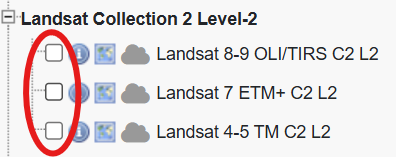
Navigate to the Data Sets tab. expand the Landsat category, then expand Landsat Collection 2 Level-2. Check the box for Landsat 8-9 OLI/TIRS C2 L2, if you want a dataset prior to April 2013, you might want to consider using Landsat 4-5 OLI/TIRS C2 L2. Then click results.

Step 3: Downloading the Image
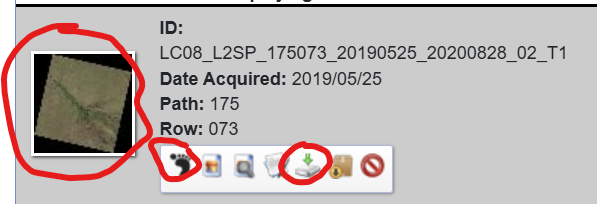
Scroll through the list of results and click on any foot icon to show the area the image covers. If you want a better look at the image, click on the image to see it up close. Once completed, close the image. Click the download icon, the green arrow, next to your chosen image.
Step 4: Downloading the Image Continued
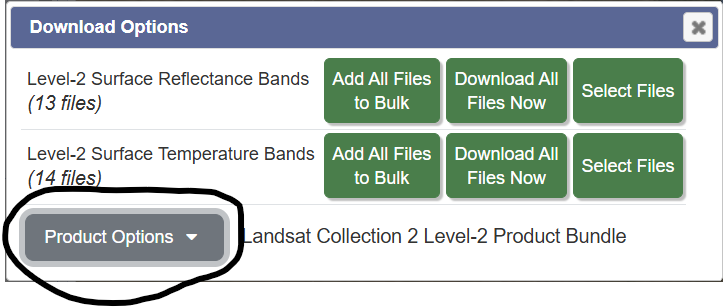
Once you have clicked the download icon, the green arrow, next to your chosen image. Click Product Options and then the grey download button beside Landsat Collection 2 Level-2 Product Bundle (a zipped folder that includes all data) which will then download the folder into your files.

Step 5: Exctracting the Data
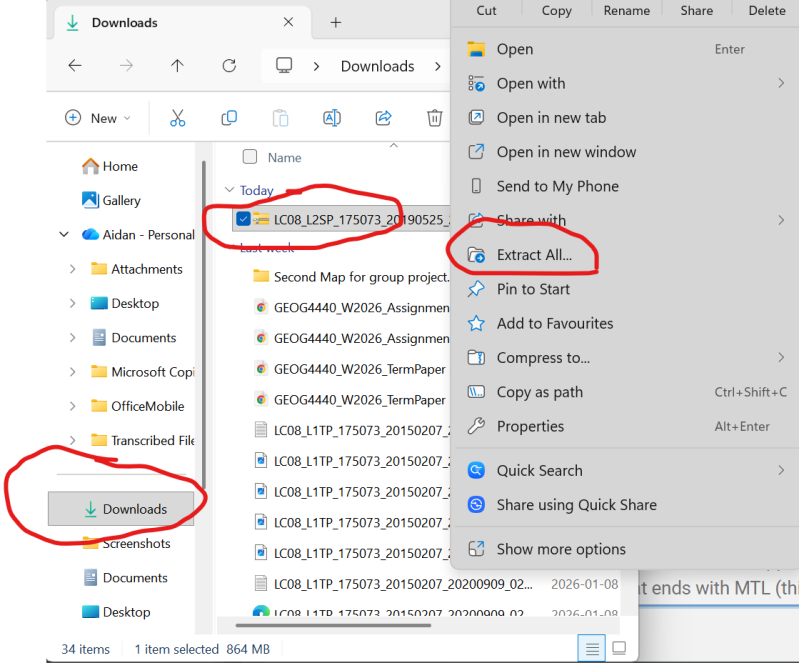
Find the file under downloads in your files. Right-click on the zipped file in your downloads and then click Extract All. Once this is done, the new file will also be found under downloads. Open the new file and look for the document that ends with MTL (this stands for Metadata and is in text file format). You may need to expand the name tab to find MTL document, then look for the document that, under the Type tab, is a text document.

Step 6: Putting the Data in Focus
Once you have found the document, open Catalyst, then select and open focus, and drag and drop the document into focus.

Create Your Own Website With Webador